
Conditions and Evaluators
Conditions let a route make a decision or narrow a database query. The editor looks similar in both places, but the two uses solve different problems:
| Where you use it | What it does |
|---|---|
| If Condition block | Evaluates values in the running route and chooses the true or false path. |
| Database blocks | Builds the filter used to select, update, or delete database records. |
If conditions: choose a route path
An If Condition compares values available to the current request—such as input, a route parameter, or a runtime variable. If the condition is true, the route follows its success branch; otherwise, it follows its false branch.
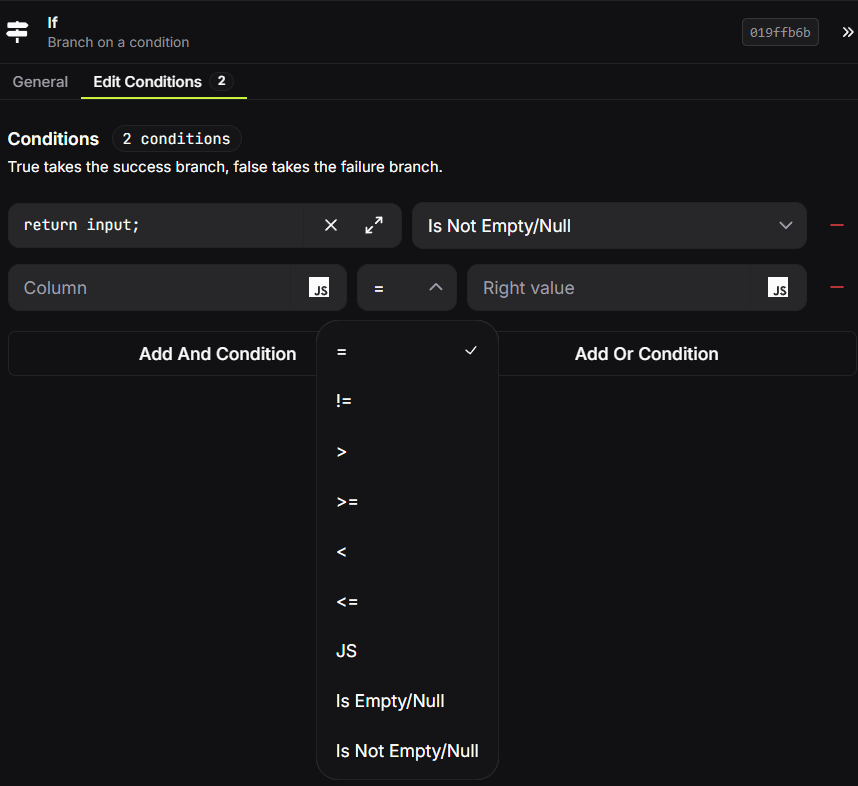
Use simple comparisons for common checks:
- Is this value equal to, greater than, or less than another value?
- Is a request field empty or present?
- Do several checks all need to pass (AND), or is any one sufficient (OR)?
Both sides of a comparison can be a literal value or a JavaScript value computed from the current request. Use the JS option when the value must be derived, for example return input.age;. For more involved rules, choose the JS operator and return the boolean result you want the block to use.
Keep an If Condition focused on a business decision. It is usually easier to understand than a large all-in-one script, and it makes the true and false paths visible on the canvas.
Database conditions: filter records
Database blocks use conditions to describe which rows or documents they should act on. Start by selecting the database column or field to filter; the condition is then applied by the database as part of the query.
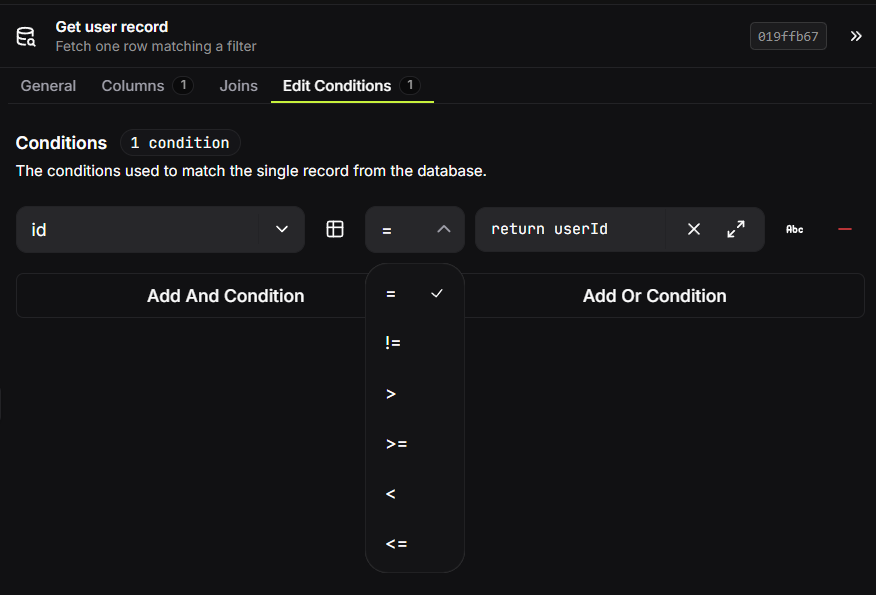
The comparison value can be:
| Value type | Example | Use it when |
|---|---|---|
| Literal | "active", 18, true | The filter value is known when you build the route. |
| JavaScript value | return userId; | The value comes from the current request or an earlier block. |
| Column reference | Compare one SQL column with another | The comparison depends on data already in the same record. |
For SQL connections, column references are resolved as database columns rather than ordinary text. Use a literal when you mean the characters exactly as written. For dynamic values, use the JavaScript option instead of assembling raw query text.
The same comparison operators—equals, not equals, greater/less than and their inclusive forms—are available for database filters. Combine conditions with AND or OR to make the filter more specific or provide alternatives.
Tip: Add only the conditions required to identify the intended records. A broad update or delete filter can affect more rows than expected.
Choosing the right kind of condition
Use an If Condition when you are deciding where the route should go next. Use a database condition when you are deciding which records a database block should read or change. If you need both, filter the record first, then use an If Condition to decide how to respond to the result.